
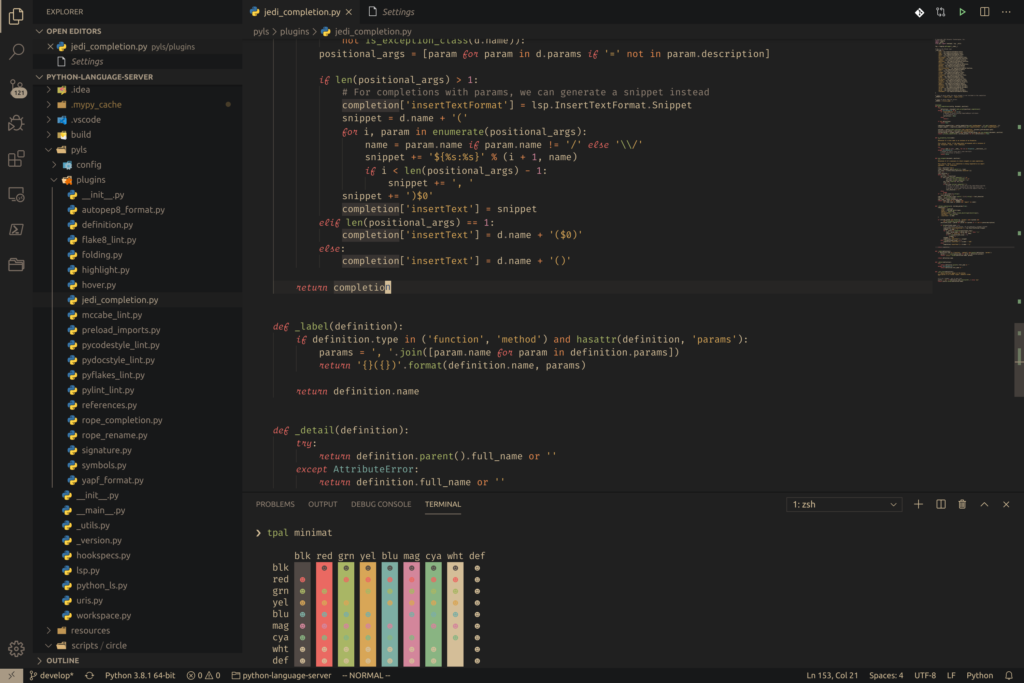
In the world of software development, productivity is influenced by far more than programming skills alone. Developers spend countless hours staring at code editors, terminals, and development environments, making the visual experience a critical factor in overall efficiency. A well-designed color scheme can reduce eye strain, improve readability, enhance focus, and ultimately help programmers work more effectively. Among the many themes available today, Gruvbox has emerged as one of the most beloved choices for developers across different programming languages and operating systems.
Gruvbox is a retro-inspired color scheme designed to provide a comfortable coding experience while maintaining excellent contrast and readability. Created with a carefully selected palette of warm colors, Gruvbox has become a favorite among developers who value both aesthetics and functionality. Unlike many themes that rely on extremely bright colors or excessive contrast, Gruvbox strikes a balance that helps programmers remain productive during long coding sessions.
Understanding Gruvbox and Its Design Philosophy
Gruvbox was designed with a unique philosophy that prioritizes visual comfort without sacrificing clarity. Unlike traditional dark themes that often use pure black backgrounds and highly saturated colors, Gruvbox uses soft, earthy tones inspired by retro color palettes.
The theme comes in both dark and light variants, allowing users to choose an environment that best suits their preferences and working conditions. The dark version is especially popular because it reduces brightness while maintaining sufficient contrast between code elements.
One of the defining characteristics of Gruvbox is its balanced color palette. Keywords, functions, variables, strings, comments, and other syntax elements are assigned distinct colors that remain visually pleasing without becoming distracting. This careful balance allows developers to identify important code structures quickly and accurately.
The design philosophy behind Gruvbox centers on minimizing visual fatigue while maximizing code comprehension. Every color choice serves a purpose, ensuring that developers can spend more time solving problems and less time struggling with visual distractions.
The Relationship Between Coding Themes and Productivity
Many people underestimate the impact of coding themes on productivity. However, programmers often spend eight or more hours per day looking at code. During these long sessions, visual comfort plays a significant role in maintaining concentration and reducing mental fatigue.
A poorly designed theme can cause eye strain, headaches, and reduced focus. Excessive brightness, low contrast, or confusing color choices can make it difficult to distinguish code elements quickly. This forces developers to spend additional mental energy interpreting what they see.
Conversely, a well-designed theme like Gruvbox helps developers process information more efficiently. By presenting code in a visually organized manner, the theme reduces cognitive load and allows programmers to focus on logic rather than visual interpretation.
Productivity gains may seem small initially, but over weeks, months, and years, these improvements accumulate into substantial benefits. Faster code reading, reduced eye fatigue, and improved concentration can significantly impact overall development performance.
Enhanced Code Readability
One of the primary ways Gruvbox improves coding productivity is through superior readability. Readability is essential because developers spend far more time reading code than writing it.
Gruvbox uses carefully selected colors that clearly differentiate between various syntax elements. Keywords stand out without appearing overly bright, strings remain easy to identify, and comments are visible without distracting from active code.
This clear distinction allows developers to scan code quickly and understand program structure more efficiently. When syntax elements are visually separated, programmers can identify functions, loops, variables, and conditions with minimal effort.
The readability benefits become especially apparent in large projects where developers frequently navigate thousands of lines of code. Gruvbox helps reduce the time needed to locate specific sections and understand complex logic.
Because the theme emphasizes clarity rather than flashy visuals, it supports sustained productivity during extended coding sessions.
Reduced Eye Strain During Long Coding Sessions
Eye strain is a common challenge for developers. Spending hours in front of a monitor can lead to discomfort, blurred vision, headaches, and reduced concentration.
Gruvbox addresses this issue through its carefully balanced color palette. Instead of relying on harsh blacks and bright whites, the theme uses softer background colors and muted foreground tones.
This design reduces the intensity of light emitted from the screen, making the coding environment more comfortable. Developers often report that Gruvbox feels easier on the eyes compared to themes with extreme contrast levels.
Reduced eye strain contributes directly to productivity because programmers can work longer without experiencing discomfort. When visual fatigue is minimized, focus remains stronger and coding sessions become more efficient.
The dark variant of Gruvbox is particularly effective in low-light environments where bright themes may cause excessive glare and discomfort.
Better Focus and Concentration
Productivity depends heavily on the ability to maintain concentration. Distractions can interrupt thought processes and significantly slow development work.
Gruvbox promotes focus by creating a calm and visually balanced environment. Its warm color palette feels less aggressive than many modern themes, helping developers remain relaxed and engaged.
The theme avoids excessive color saturation, ensuring that important code elements stand out without overwhelming the user. This subtle approach reduces visual noise and allows programmers to concentrate on problem-solving tasks.
When developers feel visually comfortable, they are more likely to enter a state of deep focus. This mental state is associated with higher productivity, faster coding, and improved code quality.
Many developers who switch to Gruvbox report feeling less distracted and more immersed in their work, contributing to consistent productivity gains.
Faster Code Navigation
Efficient navigation is crucial for productivity, especially in large applications. Developers constantly move between files, functions, classes, and modules.
Gruvbox helps speed up navigation by making code structures easier to recognize visually. Different syntax elements have distinct colors that guide the eye naturally through the codebase.
Functions are easy to identify, variable names stand out appropriately, and comments provide context without dominating the screen. This visual organization allows developers to locate information more quickly.
Faster navigation reduces the time spent searching through files and increases the time available for actual development work. Even small improvements in navigation efficiency can result in meaningful productivity gains over time.
Improved Error Detection
Finding bugs quickly is one of the most valuable productivity benefits a coding theme can provide. Syntax highlighting plays a significant role in helping developers identify mistakes.
Gruvbox uses distinct color assignments that make anomalies easier to spot. Missing brackets, incorrect keywords, misplaced symbols, and syntax errors often become more visible due to the theme’s clear visual structure.
Developers can identify inconsistencies more rapidly because the color scheme emphasizes important distinctions without cluttering the interface.
Improved error detection leads to faster debugging, reduced development time, and fewer mistakes reaching production environments.
The ability to spot issues quickly contributes significantly to overall coding productivity.
Lower Cognitive Load
Cognitive load refers to the mental effort required to process information. High cognitive load can reduce productivity by consuming mental resources that could otherwise be used for problem-solving.
Gruvbox minimizes cognitive load through consistent and intuitive color usage. Developers quickly learn what each color represents, reducing the effort needed to interpret code.
Instead of constantly analyzing syntax highlighting, programmers can focus on understanding program logic and implementing solutions.
This reduction in mental overhead helps maintain energy levels throughout the day and supports sustained productivity over long periods.
By simplifying visual processing, Gruvbox allows developers to allocate more cognitive resources to meaningful work.
Consistency Across Development Tools
Modern developers use multiple tools throughout their workflow, including code editors, terminals, version control systems, and integrated development environments.
Gruvbox is available for a wide variety of platforms and applications. This widespread support allows developers to maintain a consistent visual experience across their entire development environment.
Consistency improves productivity by reducing context switching. When colors remain familiar across tools, users can transition smoothly between tasks without needing to adapt to different visual systems.
Whether working in a terminal, text editor, or IDE, developers benefit from a unified appearance that supports efficient workflow management.
Customization for Individual Preferences
Every developer has unique preferences regarding colors, contrast levels, and visual comfort. Gruvbox accommodates these differences through extensive customization options.
Users can choose between dark and light variants, adjust contrast settings, and customize individual colors to suit their needs. This flexibility allows developers to create an environment optimized for their specific workflow.
Personalized workspaces contribute to productivity because developers can tailor their environment to maximize comfort and efficiency.
The ability to fine-tune visual settings ensures that Gruvbox remains effective for a wide range of users and working conditions.
Enhanced Terminal Productivity
Terminals remain essential tools for many developers, especially those working with Linux systems, cloud platforms, and DevOps workflows.
Gruvbox offers excellent terminal integration, bringing the same readability and comfort benefits to command-line environments.
Commands, output messages, warnings, and errors are displayed using colors that remain clear and easy to interpret. This consistency helps developers work more efficiently across different interfaces.
Because terminal work often involves reading logs, executing commands, and monitoring processes, improved readability can significantly impact productivity.
Gruvbox transforms the terminal into a more comfortable and efficient workspace.
Psychological Benefits of a Pleasant Workspace
Productivity is influenced not only by technical factors but also by emotional and psychological well-being. Developers who enjoy their work environment are often more motivated and engaged.
Gruvbox creates a visually appealing workspace that many programmers find enjoyable. The warm retro-inspired palette generates a sense of comfort and familiarity.
A pleasant environment can improve mood, reduce stress, and increase motivation. These psychological benefits contribute indirectly to higher productivity.
When developers enjoy spending time in their coding environment, they are more likely to remain focused and productive throughout the day.
Supporting Long-Term Development Projects
Large software projects often require months or years of continuous development. During these extended periods, maintaining productivity becomes increasingly important.
Gruvbox supports long-term productivity by reducing visual fatigue and promoting sustainable work habits. Its comfortable design encourages consistent performance over extended timeframes.
Developers working on complex projects benefit from an environment that remains pleasant and functional even after thousands of hours of use.
The theme’s balanced design helps prevent burnout associated with uncomfortable visual experiences.
Why Professional Developers Prefer Gruvbox
Many professional developers choose Gruvbox because it combines aesthetics with practical benefits. Unlike themes designed primarily for visual appeal, Gruvbox focuses on usability and efficiency.
Professionals appreciate its readability, comfortable contrast levels, extensive customization options, and cross-platform compatibility.
The theme performs equally well for web development, software engineering, system administration, data science, and other technical disciplines.
Its ability to improve focus, reduce eye strain, and streamline code comprehension makes it a valuable productivity tool for developers at all experience levels.
FAQs
1. What is Gruvbox and why is it popular among developers?
Gruvbox ek retro-inspired color scheme hai jo coding ke liye design ki gayi hai. Yeh developers ko better readability, smooth contrast aur eye comfort provide karti hai, isi wajah se yeh bohat popular hai.
2. How does Gruvbox improve coding productivity?
Gruvbox coding productivity improve karti hai kyun ke yeh code ko readable banati hai, eye strain kam karti hai, aur developers ko focus maintain karne mein help karti hai.
3. Is Gruvbox better than other coding themes?
Gruvbox ka main advantage us ka balanced color palette hai jo na zyada bright hota hai aur na zyada dull. Yeh many developers ke liye more comfortable aur productive environment create karta hai.
4. Can Gruvbox reduce eye strain during long coding sessions?
Yes, Gruvbox specially eye comfort ke liye design ki gayi hai. Is ke soft colors aur balanced contrast ki wajah se long coding sessions mein eye strain kam hota hai.
5. Does Gruvbox work in all code editors?
Gruvbox almost all popular editors jese VS Code, Vim, Neovim, Sublime Text aur IntelliJ IDEA mein available hai.
6. Is Gruvbox suitable for beginners?
Yes, beginners ke liye bhi Gruvbox bohat useful hai kyun ke yeh code structure ko clearly highlight karta hai, jo learning process ko easy banata hai.
7. Does Gruvbox improve focus while coding?
Ji haan, Gruvbox ka calm aur soft color scheme distractions ko reduce karta hai aur developers ko better focus maintain karne mein help karta hai.
8. Dark mode ya light mode Gruvbox mein kaunsa better hai?
Yeh user preference par depend karta hai. Dark mode zyada popular hai kyun ke yeh low-light environments mein comfortable hota hai.
Conclusion
Gruvbox improves coding productivity by creating a comfortable, readable, and visually balanced development environment. Its carefully crafted color palette reduces eye strain, enhances focus, improves code readability, and lowers cognitive load. These benefits help developers work more efficiently, detect errors faster, and maintain concentration during long coding sessions.The theme’s consistency across tools, extensive customization options, and support for both dark and light variants make it suitable for a wide range of workflows. Beyond its technical advantages, Gruvbox also contributes to a more enjoyable coding experience, supporting long-term productivity and developer satisfaction.