Developers spend countless hours staring at code editors, terminals, and development environments. Because of this, choosing the right color scheme is more important than many people realize. A well-designed theme can improve readability, reduce eye strain, and create a more enjoyable coding experience. Among the many themes available today, Gruvbox has become one of the most beloved choices in the developer community.
Whether you are a beginner learning programming or an experienced software engineer managing large projects, chances are you have heard developers discussing Gruvbox. Its unique blend of warm colors, balanced contrast, and minimalist design has helped it gain a loyal following worldwide.
What Is Gruvbox
Gruvbox is a retro-inspired color scheme designed primarily for code editors and terminal applications. It was originally created by Pavel Pertsev and quickly became popular among programmers who wanted a theme that was visually appealing without being distracting.
Unlike many modern themes that rely on extremely bright colors or pure black backgrounds, Gruvbox uses carefully selected warm tones and earthy colors. This creates a comfortable visual environment that many developers find easier on their eyes during long coding sessions.
Gruvbox is available for numerous development tools, including:
- Vim
- Neovim
- Visual Studio Code
- Sublime Text
- JetBrains IDEs
- Emacs
- Terminal applications
- GitHub themes
Its cross-platform availability has played a major role in its widespread adoption.
The Philosophy Behind Gruvbox
One reason Gruvbox stands out is its design philosophy.The creator focused on balancing contrast rather than maximizing it. Many themes use pure black and bright white combinations that can become uncomfortable over time. Gruvbox instead uses softer backgrounds and muted foreground colors while maintaining excellent readability.The goal is to create an environment where syntax highlighting remains useful without overwhelming the user.This philosophy appeals to developers because coding often requires concentration for extended periods. A theme that reduces visual fatigue can significantly improve the overall development experience.
Key Features of Gruvbox
Warm and Comfortable Color Palette
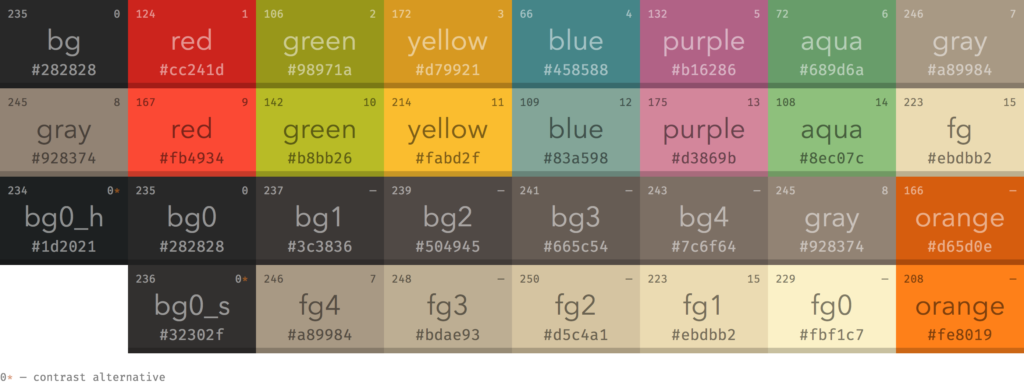
The most noticeable characteristic of Gruvbox is its warm color palette.Instead of cold blues and harsh whites, Gruvbox uses:
- Warm browns
- Soft yellows
- Muted greens
- Gentle reds
- Comfortable oranges
These colors work together harmoniously, creating a coding environment that feels natural and inviting.
Excellent Syntax Highlighting
Syntax highlighting is essential for identifying variables, functions, keywords, strings, and comments.Gruvbox carefully assigns colors to different programming elements, making code easier to scan and understand. The distinction between various syntax categories is clear without being excessively colorful.This balance helps developers identify patterns and detect errors more quickly.
Multiple Contrast Levels
Another feature developers appreciate is the ability to choose different contrast settings.Gruvbox typically offers:
- Hard contrast
- Medium contrast
- Soft contrast
Users can select the level that best matches their screen, lighting conditions, and personal preferences.
Dark and Light Variants
Not everyone prefers dark themes.Gruvbox supports both dark and light versions, allowing developers to choose based on their working environment. The light version retains the same warm color philosophy while providing a bright interface for daytime use.
Consistent Design Across Platforms
Consistency is important for productivity.Developers often switch between multiple tools throughout the day. Gruvbox provides a similar visual experience across editors, terminals, and development environments.This consistency reduces cognitive load and creates a seamless workflow.
Why Developers Prefer Gruvbox Over Other Themes
Reduced Eye Strain
One of the biggest reasons developers choose Gruvbox is comfort.Many programmers spend eight or more hours each day coding. High-contrast themes can become exhausting over long periods. Gruvbox’s softer color choices help reduce eye strain while maintaining readability.This makes it particularly popular among professionals who code full-time.
Improved Focus
A good coding theme should help developers focus on their work rather than draw attention to itself.Gruvbox achieves this by using colors thoughtfully. Important syntax elements stand out while less critical components remain subtle.The result is a distraction-free coding experience.
Better Readability
Code readability affects productivity.Developers frequently review large codebases containing thousands of lines. Gruvbox makes it easier to distinguish between code elements, reducing mental effort when navigating files.Many users report that they can read code more comfortably after switching to Gruvbox.
Aesthetic Appeal
While functionality matters most, appearance also plays a role.Gruvbox offers a unique visual style that feels professional and modern while maintaining a retro-inspired character. Its warm tones create a pleasant atmosphere that many developers genuinely enjoy.This emotional connection contributes significantly to its popularity.
Gruvbox and Productivity
A coding theme cannot magically make someone a better programmer, but it can influence productivity.
Faster Code Recognition
Color coding helps developers quickly identify:
- Functions
- Classes
- Variables
- Keywords
- Comments
- Strings
Gruvbox uses colors effectively to improve visual recognition without creating clutter.
Reduced Fatigue
Visual fatigue can lead to reduced concentration and more mistakes.Because Gruvbox uses balanced contrast and softer colors, many developers find they can work comfortably for longer periods.
Consistent Workflow
Using the same theme across multiple tools creates familiarity.When terminals, editors, and IDEs share a similar appearance, developers spend less time adapting to different interfaces and more time focusing on coding.
Gruvbox Customization Options
Another reason developers love Gruvbox is its flexibility.
Background Variations
Users can choose from different background styles depending on their preferences.Some prefer darker backgrounds for nighttime coding, while others choose softer variants for improved comfort.
Contrast Adjustments
The ability to switch between hard, medium, and soft contrast settings allows users to fine-tune the experience.This adaptability makes Gruvbox suitable for various monitors and lighting environments.
Plugin Integration
Many versions of Gruvbox support integrations with plugins and extensions.This ensures that file explorers, status bars, terminal prompts, and other interface components match the overall design.
Font Pairing
Gruvbox works particularly well with developer-friendly fonts such as:
- Fira Code
- JetBrains Mono
- Cascadia Code
- Source Code Pro
Combining Gruvbox with a quality programming font creates an even better coding experience.
Gruvbox in Popular Editors
Visual Studio Code
VS Code users can install Gruvbox directly from the marketplace.The theme integrates seamlessly with the editor and supports modern features such as semantic highlighting.
Vim and Neovim
Gruvbox has strong roots in the Vim community.Many Vim and Neovim users consider it one of the best themes available due to its excellent terminal compatibility and customization options.
JetBrains IDEs
Developers using IntelliJ IDEA, PyCharm, WebStorm, and other JetBrains products can also enjoy Gruvbox through dedicated theme plugins.
Sublime Text
Sublime Text users can install Gruvbox to create a consistent coding environment across different development platforms.
Gruvbox Compared to Other Popular Themes
Gruvbox vs Dracula
Dracula uses vibrant purples and bright accent colors.Gruvbox focuses on warm, earthy tones and softer contrasts. Developers seeking a calmer visual experience often prefer Gruvbox.
Gruvbox vs Solarized
Solarized emphasizes scientifically designed color relationships.Gruvbox offers a warmer appearance and stronger contrast, making it more appealing to developers who prefer traditional syntax highlighting.
Gruvbox vs One DarkOne Dark is modern and balanced, making it a popular choice among developers.
However, Gruvbox provides a more distinctive visual identity and warmer color palette.
Gruvbox vs Nord
Nord uses cool blue tones and a minimalist style.Gruvbox takes the opposite approach with warm colors and a retro-inspired aesthetic.he choice often comes down to personal preference.
Who Should Use Gruvbox?
Gruvbox is ideal for:
- Software developers
- Web developers
- Data scientists
- DevOps engineers
- System administrators
- Students learning programming
Anyone who spends significant time working with code can benefit from Gruvbox’s thoughtful design.
It is especially useful for developers seeking a comfortable and visually appealing environment that minimizes eye strain.
Tips for Getting the Most Out of Gruvbox
To maximize your experience with Gruvbox:
- Experiment with different contrast levels.
- Pair it with a high-quality coding font.
- Use matching terminal themes.
- Enable syntax highlighting enhancements.
- Try both dark and light variants.
- Customize interface elements to maintain visual consistency.
Small adjustments can significantly improve comfort and productivity.
The Future of Gruvbox
Despite the constant release of new themes, Gruvbox continues to maintain a strong following.Its enduring popularity comes from a timeless design philosophy focused on readability, comfort, and simplicity. As development tools evolve, Gruvbox continues receiving updates and community supportThe theme has become more than just a color scheme. For many developers, it represents a preferred way of working.
FAQs
1. What is Gruvbox?
Gruvbox is a retro-inspired color theme designed for code editors, terminals, and development environments.
2. Why is Gruvbox so popular among developers?
Developers appreciate Gruvbox for its readability, warm colors, reduced eye strain, and balanced contrast.
3. Is Gruvbox available for Visual Studio Code?
Yes, Gruvbox can be installed directly from the Visual Studio Code marketplace.
4. Does Gruvbox support light mode?
Yes, Gruvbox includes both dark and light variants.
5. Is Gruvbox good for long coding sessions?
Many developers find Gruvbox comfortable for extended coding sessions because of its softer color palette.
6. Can I customize Gruvbox?
Yes, Gruvbox offers various customization options including contrast settings and background variations.
7. Which programming fonts work well with Gruvbox?
Popular choices include JetBrains Mono, Fira Code, Cascadia Code, and Source Code Pro.
8. Is Gruvbox free to use?
Yes, Gruvbox is generally available for free across most supported editors and platforms.
9. Does Gruvbox work with Vim and Neovim?
Yes, Gruvbox is highly popular within both the Vim and Neovim communities.
10. Should beginners use Gruvbox?
Absolutely. Gruvbox is beginner-friendly and provides a comfortable coding experience for users of all skill levels.
Conclusion
Gruvbox has earned its reputation as one of the most loved developer themes available today. Its warm color palette, balanced contrast, excellent readability, and extensive customization options make it a favorite among programmers worldwide.
Unlike flashy themes that prioritize appearance over usability, Gruvbox successfully combines beauty with functionality. It reduces eye strain, improves focus, and creates a coding environment that many developers find both productive and enjoyable.