
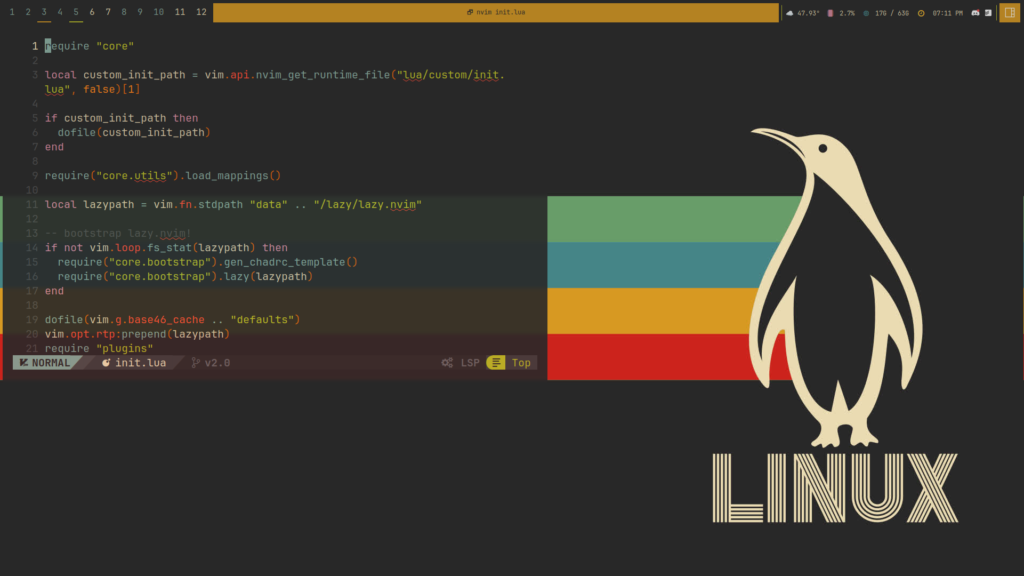
Choosing the right code editor theme may seem like a small decision, but it can have a big impact on your coding experience. Developers spend hours every day looking at their screens, reading code, debugging applications, and managing projects. A good theme can reduce eye strain, improve readability, and make coding more enjoyable.
One theme that has gained a loyal following among programmers is Gruvbox. Known for its warm colors and retro-inspired design, Gruvbox has become one of the most popular themes for code editors and terminal applications.
What Is Gruvbox
Gruvbox is a popular color scheme originally created for Vim users. Over time, it expanded to many development tools, including Visual Studio Code, Neovim, IntelliJ IDEA, terminal emulators, and other programming environments.
Unlike themes that rely on bright neon colors, Gruvbox uses earthy tones and balanced contrasts. The result is a comfortable visual experience that many developers find easier on the eyes during long coding sessions.
The theme focuses on readability and consistency. Every color is carefully selected to help developers distinguish different code elements without overwhelming the screen.
Why Gruvbox Became So Popular
Gruvbox gained popularity because it solves a common problem faced by developers. Many themes look attractive at first but become uncomfortable after hours of use.
Gruvbox takes a different approach. Instead of using extreme contrast or flashy colors, it creates a balanced environment that remains comfortable throughout the day.
Developers appreciate the theme because it combines functionality with aesthetics. It looks professional while remaining highly practical for real-world programming work.
Key Features of Gruvbox
Warm Retro Color Palette
One of the most recognizable features of Gruvbox is its unique color palette. The theme uses warm shades of brown, yellow, green, blue, orange, and red.These colors create a pleasant visual atmosphere that feels natural and less aggressive than many modern themes.
Excellent Readability
Readability is one of the strongest reasons developers choose Gruvbox.Keywords, functions, variables, comments, and strings are clearly separated through carefully selected colors. This makes code easier to understand and navigate.When reading large codebases, this improved readability can save time and reduce mistakes.
Dark and Light Modes
Gruvbox offers both dark and light versions.The dark version is especially popular among developers who work late at night or prefer darker interfaces. The light version provides the same design philosophy while offering a brighter environment for daytime work.This flexibility allows users to choose the option that best matches their workspace.
Multiple Contrast Levels
Another useful feature is the ability to select different contrast settings.Users can choose:
- Soft contrast
- Medium contrast
- Hard contrast
These options allow developers to adjust the appearance according to their personal preferences and monitor setup.
Consistent Cross Platform Experience
Many developers use multiple tools throughout the day. Gruvbox is available for a wide range of editors, IDEs, and terminals.Using the same theme across all tools creates a consistent experience and helps maintain focus.
Pros of Using Gruvbox
Reduced Eye Strain
One of the biggest benefits of Gruvbox is eye comfort.The warm colors and balanced contrast make it easier to work for extended periods without experiencing visual fatigue.Many users report that Gruvbox feels more relaxing than themes with bright backgrounds or highly saturated colors.
Better Focus
Because the colors are carefully balanced, Gruvbox minimizes visual distractions.The theme helps developers focus on their code rather than the appearance of the interface.This can improve concentration during complex programming tasks.
Easy to Learn
New developers often find Gruvbox easy to understand.The color distinctions are clear and intuitive, making it easier to identify code structures and syntax elements.
Strong Community Support
Gruvbox has been around for years and enjoys strong community support.There are countless tutorials, plugins, ports, and configuration guides available online.This makes installation and customization much easier for beginners.
Cons of Using Gruvbox
While Gruvbox offers many benefits, it may not be perfect for everyone.
Warm Colors May Not Appeal to Everyone
Some developers prefer cooler themes with blue or purple tones.Because Gruvbox uses earthy colors, users who enjoy modern neon themes may find it less exciting.
Learning Curve for Customization
Although basic installation is simple, advanced customization can require editing configuration files.New users may need some time to learn these settings.
Personal Preference Matters
Theme selection is highly subjective.
A theme that feels perfect for one developer may not work well for another. It is always worth testing Gruvbox yourself before making a final decision.
Is Gruvbox Worth Using
For most developers, the answer is yes.Gruvbox provides an excellent balance between aesthetics and functionality. It improves readability, reduces eye strain, and creates a comfortable coding environment.f you spend several hours a day writing code, the benefits become even more noticeable.The theme is particularly valuable for developers who prioritize comfort and long-term usability over flashy visual effects.
How to Install Gruvbox
Installing Gruvbox in Visual Studio Code
The easiest way to install Gruvbox in VS Code is through the Extensions Marketplace.
- Open VS Code.
- Click Extensions.
- Search for Gruvbox.
- Choose a trusted Gruvbox theme.
- Click Install.
- Select the theme from Color Themes.
The new appearance will be applied immediately.
Installing Gruvbox in Neovim
For Neovim users:
- Open your plugin manager configuration.
- Add the Gruvbox repository.
- Install the plugin.
- Enable Gruvbox in your configuration file.
After restarting Neovim, the theme will become active.
Installing Gruvbox in Vim
The process is similar to Neovim.Add the Gruvbox plugin through your preferred plugin manager and set it as your default colorscheme.
Installing Gruvbox in Terminal Applications
Many popular terminal emulators support Gruvbox.
Examples include:
- Windows Terminal
- Alacritty
- Kitty
- iTerm2
- GNOME Terminal
Most installations involve importing a configuration file and selecting the Gruvbox profile.
Customizing Gruvbox
One reason for Gruvbox’s popularity is its flexibility.
Choose Your Contrast Level
Different users prefer different levels of contrast.Soft contrast creates a gentler appearance, while hard contrast increases visual separation between elements.Experimenting with these settings can help you find the most comfortable option.
Adjust Background Styles
Gruvbox allows users to modify background tones.Some prefer darker backgrounds for night work, while others choose lighter settings during the day.
Match Your Terminal and Editor
For the best experience, use Gruvbox consistently across all development tools.Matching your editor and terminal themes creates a unified workspace that feels professional and organized.
Pair with Quality Fonts
Many developers combine Gruvbox with coding fonts such as:
- JetBrains Mono
- Fira Code
- Cascadia Code
- Source Code Pro
These fonts complement the theme and improve readability even further.
Who Should Use Gruvbox
Gruvbox is suitable for:
- Beginner programmers
- Professional developers
- Web developers
- Software engineers
- Data scientists
- System administrators
- Students learning to code
Anyone who spends significant time reading and writing code can benefit from its comfortable design.
FAQs
Is Gruvbox free to use
Yes. Gruvbox is an open-source color scheme that is available for free.
Why is Gruvbox so popular
Developers love Gruvbox because it provides excellent readability, balanced colors, and reduced eye strain.
Does Gruvbox support Visual Studio Code
Yes. Multiple Gruvbox theme extensions are available for Visual Studio Code.
Is Gruvbox available for Neovim
Yes. Gruvbox is widely used in Neovim and has strong community support.
Does Gruvbox have a light mode
Yes. Gruvbox offers both dark and light theme variants.
Can I customize Gruvbox colors
Yes. Users can adjust contrast levels, background styles, and syntax highlighting settings.
Is Gruvbox good for beginners
Yes. Its clear syntax highlighting and comfortable design make it beginner friendly.
Does Gruvbox reduce eye strain
Many users find Gruvbox more comfortable than brighter themes because of its warm color palette and balanced contrast.
Conclusion
Gruvbox remains one of the most respected coding themes available today. Its warm retro color palette, excellent readability, flexible customization options, and strong community support make it a fantastic choice for developers.While personal preference always plays a role in theme selection, Gruvbox consistently delivers a comfortable and productive coding experience.If you are looking for a theme that prioritizes readability, reduces eye strain, and works across multiple development tools, Gruvbox is absolutely worth trying.