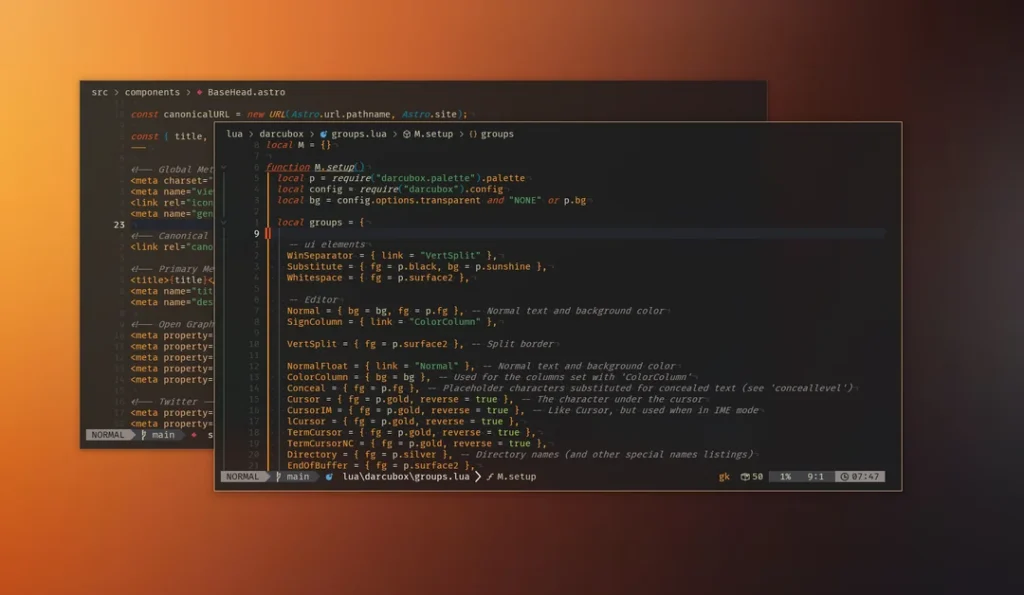
Every developer spends countless hours looking at a code editor, terminal, or integrated development environment. While programming skills, tools, and frameworks are important, the visual environment in which developers work can also have a significant impact on productivity and comfort. A well-designed color theme can improve code readability, reduce eye strain, and make long coding sessions more enjoyable.
Among the many themes available today, Gruvbox has become one of the most beloved color schemes in the programming community. Known for its warm retro-inspired colors, balanced contrast, and excellent readability, Gruvbox has earned a reputation as a theme that combines aesthetics with functionality. Whether you are a beginner learning Python or an experienced software engineer working on large projects, Gruvbox offers a coding environment that many developers find both comfortable and efficient.
What Is Gruvbox?
Gruvbox is a color scheme originally created for the Vim text editor. It was designed by Pavel Pertsev with the goal of creating a retro-inspired color palette that remains comfortable for extended coding sessions.
Unlike themes that rely on extreme contrast such as pure black backgrounds or bright white interfaces, Gruvbox uses carefully selected warm colors and moderate contrast levels. The result is a coding environment that feels visually balanced and pleasant.
Over time, Gruvbox gained immense popularity among developers because of its readability and unique appearance. As demand increased, the theme was ported to numerous editors, terminals, and development environments.
Today, Gruvbox is supported in:
- Visual Studio Code
- Vim
- Neovim
- JetBrains IDEs
- Sublime Text
- Emacs
- Atom
- Terminal emulators
- GitHub themes
- Various productivity tools
Its widespread adoption demonstrates how highly developers value the experience it provides.
The Philosophy Behind Gruvbox
Many themes focus primarily on appearance. Gruvbox, however, was designed with usability and comfort as core priorities.
The philosophy behind Gruvbox includes:
Balanced Contrast
Gruvbox avoids harsh visual extremes. Instead of using pure black or bright white backgrounds, it employs softer tones that reduce eye fatigue.
Warm Colors
The theme features earthy tones such as yellow, orange, green, blue, and purple. These colors create a comfortable visual atmosphere.
Readability First
Syntax highlighting is designed to help developers quickly distinguish between code elements without overwhelming the eyes.
Consistency
Gruvbox maintains a consistent design language across editors and terminals, creating a unified development environment.
These principles have helped Gruvbox remain relevant despite the constant emergence of new themes.
Why Developers Love Gruvbox
The popularity of Gruvbox is not accidental. Developers frequently mention several reasons for choosing it over other themes.
One major reason is comfort. Long coding sessions can become tiring when using themes with excessive brightness or contrast. Gruvbox minimizes this issue through its carefully selected palette.
Another reason is readability. Important code structures stand out clearly while maintaining visual harmony. Keywords, variables, strings, functions, and comments are easy to identify.
Developers also appreciate its unique style. While many themes look similar, Gruvbox offers a recognizable appearance that feels both nostalgic and modern.
Its flexibility further contributes to its popularity. Users can customize contrast levels, choose dark or light versions, and adapt the theme to different workflows.
Gruvbox Dark vs Gruvbox Light
One of Gruvbox’s greatest strengths is the availability of both dark and light variants.
Gruvbox Dark
Gruvbox Dark is the version most developers recognize. It features a dark gray background with warm syntax colors.
Benefits include:
- Excellent for nighttime coding
- Reduced screen brightness
- Modern appearance
- Comfortable long sessions
Many developers choose Gruvbox Dark because it creates an immersive coding experience.
Gruvbox Light
Gruvbox Light uses a warm cream-colored background instead of dark tones.
Benefits include:
- Excellent daytime readability
- Natural reading experience
- Professional appearance
- Better visibility in bright rooms
Some developers prefer Gruvbox Light because it resembles printed documents and technical books.
Key Features of Gruvbox
Several features distinguish Gruvbox from other coding themes.
Retro Color Palette
The retro-inspired colors create a distinctive visual identity that many developers find appealing.
Soft Backgrounds
Instead of relying on harsh black or white backgrounds, Gruvbox uses softer shades that improve comfort.
Clear Syntax Highlighting
Different code elements receive unique colors, helping developers understand code structure quickly.
Multiple Contrast Modes
Users can choose soft, medium, or hard contrast levels depending on their preferences.
Broad Compatibility
Gruvbox works across numerous development tools and operating systems.
Installing Gruvbox in Visual Studio Code
Visual Studio Code is one of the most popular editors among developers.
Installing Gruvbox is straightforward.
Step 1
Open Visual Studio Code.
Step 2
Navigate to Extensions.
Step 3
Search for Gruvbox Theme.
Step 4
Click Install.
Step 5
Select Gruvbox as your active color theme.
Within seconds, your coding environment transforms into the familiar Gruvbox style.
Installing Gruvbox in Vim and Neovim
Gruvbox has deep roots in the Vim community.
Installation methods vary depending on the plugin manager being used.
Most users install Gruvbox through plugin managers such as Vim Plug, Packer, or LazyVim.
After installation, activating the theme usually requires adding a simple command to the configuration file.
Once enabled, Vim users can enjoy the classic Gruvbox experience that made the theme famous.
Gruvbox in JetBrains IDEs
Developers working with IntelliJ IDEA, PyCharm, WebStorm, or other JetBrains products can also use Gruvbox.
Installation involves downloading the theme from the JetBrains Marketplace.
After enabling the theme, developers gain access to a consistent coding environment across multiple platforms.
Customizing Gruvbox
One reason for Gruvbox’s longevity is its flexibility.
Developers can customize various aspects of the theme.
Contrast Settings
Gruvbox supports:
- Soft contrast
- Medium contrast
- Hard contrast
These options allow users to fine-tune visibility and comfort.
Syntax Colors
Many editors allow adjustments to specific syntax groups.
Developers can modify:
- Keyword colors
- Function colors
- Variable colors
- Comment colors
Terminal Integration
Gruvbox can be applied to terminal applications for a unified appearance.
Using the same color palette across editors and terminals creates a seamless workflow.
Productivity Benefits of Gruvbox
Many developers report increased productivity after switching to Gruvbox.
Several factors contribute to this perception.
Better Focus
Balanced colors reduce distractions.
Reduced Eye Fatigue
Comfortable contrast levels allow longer coding sessions.
Faster Code Recognition
Distinct syntax highlighting improves code comprehension.
Consistent Environment
Using the same theme across tools reduces mental friction.
Although productivity ultimately depends on skills and habits, many users believe Gruvbox positively affects their workflow.
Eye Strain and Visual Comfort
Eye strain is a common problem among programmers.
Hours spent staring at bright screens can lead to discomfort, headaches, and fatigue.
Gruvbox addresses this challenge by avoiding visual extremes.
The soft backgrounds and warm colors create a gentler experience compared to many high-contrast themes.
While no theme can completely eliminate eye strain, many developers find Gruvbox more comfortable than traditional alternatives.
Best Programming Languages for Gruvbox
Gruvbox works well with virtually any programming language.
It is particularly popular among developers working with:
- Python
- JavaScript
- TypeScript
- Rust
- Go
- Java
- C++
- PHP
- Ruby
The color scheme provides effective syntax highlighting regardless of language.
Common Criticisms of Gruvbox
Despite its popularity, Gruvbox is not perfect.
Some users feel the warm color palette appears unusual compared to modern themes.
Others prefer higher contrast environments for maximum visibility.
A few developers find competing themes such as Dracula, Nord, or One Dark more visually appealing.
Theme selection remains highly subjective, and personal preference plays a major role.
Gruvbox Compared to Other Popular Themes
Gruvbox vs Dracula
Dracula uses brighter and more vibrant colors.
Gruvbox offers a warmer and more natural appearance.
Gruvbox vs Nord
Nord emphasizes cool blue tones.
Gruvbox focuses on warm earthy colors.
Gruvbox vs One Dark
One Dark provides a modern minimalist appearance.
Gruvbox offers a more distinctive retro-inspired style.
Each theme has strengths, but Gruvbox stands out because of its balance between aesthetics and comfort.
Tips for Getting the Most Out of Gruvbox
To maximize your experience with Gruvbox:
- Experiment with contrast settings.
- Match your terminal theme to your editor.
- Choose the dark version for nighttime coding.
- Use the light version during the day.
- Adjust font settings alongside theme customization.
- Test different syntax highlighting options.
Small adjustments can significantly improve comfort and productivity.
Is Gruvbox Worth Using in 2026?
Despite being around for years, Gruvbox remains highly relevant.
Many modern themes come and go, but Gruvbox continues to attract new users because of its thoughtful design and practical benefits.
Its strong community support, broad compatibility, and proven track record make it a dependable choice for developers of all experience levels.
Whether you are learning programming for the first time or managing enterprise-level projects, Gruvbox remains a theme worth considering.
FAQs
What is Gruvbox?
Gruvbox is a popular coding theme known for its warm colors, balanced contrast, and comfortable reading experience.
Is Gruvbox good for programming?
Yes. Many developers use Gruvbox because it improves readability and reduces visual fatigue during long coding sessions.
Does Gruvbox support Visual Studio Code?
Yes. Gruvbox is available for Visual Studio Code through the Extensions Marketplace.
Which is better, Gruvbox Dark or Gruvbox Light?
Gruvbox Dark is often preferred for low-light environments, while Gruvbox Light works well in bright conditions.
Is Gruvbox free?
Yes. Gruvbox is an open-source theme and is available free of charge.
Why is Gruvbox so popular?
Its combination of readability, comfort, customization, and unique design has made it one of the most widely used themes among developers.
Conclusion
Gruvbox is more than just a color theme. It is a carefully designed coding environment built around readability, comfort, and productivity. Its warm retro-inspired palette, balanced contrast levels, and broad compatibility have helped it become one of the most respected themes in the developer community.The availability of both dark and light variants ensures that developers can find a version suited to their workspace and preferences. Whether you prefer the immersive feel of Gruvbox Dark or the clean readability of Gruvbox Light, the theme offers a polished and enjoyable coding experience.